
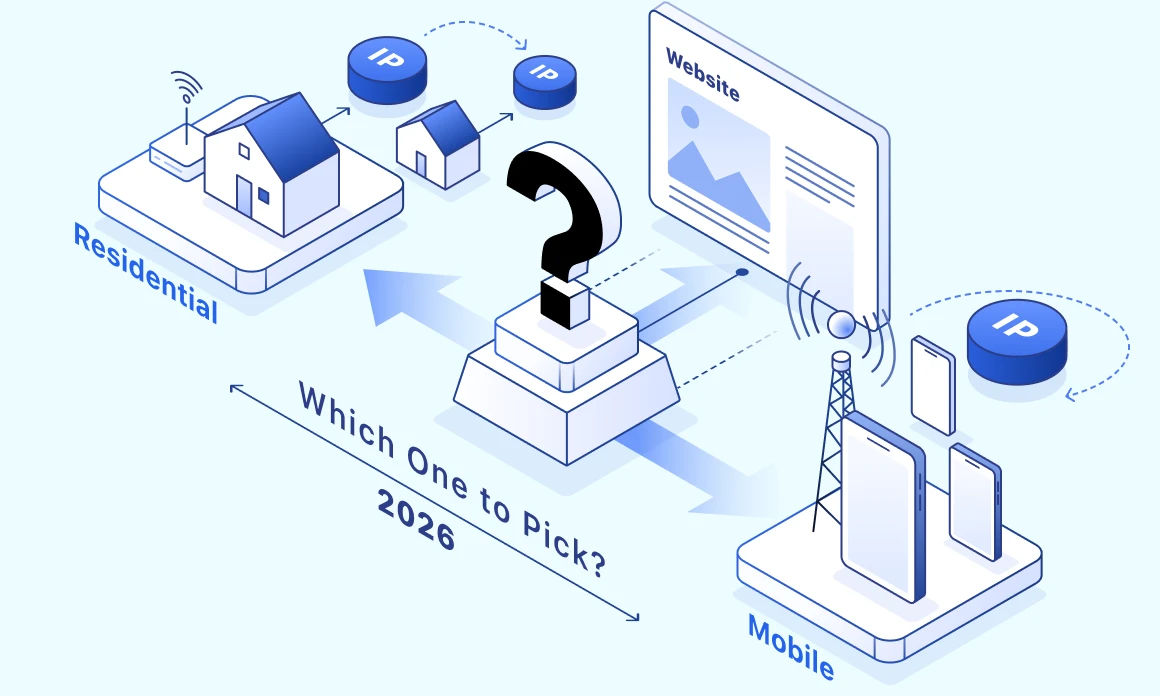

The difference between the mobile proxy vs residential proxy lies in the IP source and exclusivity. Mobile proxies route traffic through SIM devices on cellular networks. They use IPv4 addresses shared by hundreds of subscribers via CGNAT, giving them high anti-bot trust on app-tier platforms. Residential proxies are assigned by ISPs and use IPs mapped 1:1 to a household, with precise geo-targeting and longer sessions.
What’s the difference between mobile and residential proxies?
Anti-bot systems assign both proxy types higher trust scores than datacenter IPs because they use real consumer devices as an intermediary to route traffic. It’s the network setup that shows the difference between mobile and residential proxies.
Mobile proxy
To route traffic, a mobile proxy uses a SIM-connected device on a 4G or 5G cellular network. For destination websites, requests from mobile proxies are indistinguishable from real users on a carrier like Verizon Wireless (AS6167) or T-Mobile USA (AS21928). Mobile carriers use a specific network setup called CGNAT (Carrier-Grade NAT). Instead of each subscriber getting their own public IP, hundreds of people share one public IP at the same time, which helps to overcome depleting IPv4 pools. Carriers also periodically refresh these public IPs, which limits how long the sessions are and how consistent the throughput can be.
Residential proxy
When you use a residential proxy, your traffic goes through an IP assigned by a fixed-line consumer ISP (Internet Service Provider), for example, Comcast (AS7922). The IP is typically mapped 1:1 to a household connection. To website anti-bot systems, this request looks just like a real user browsing from a real device in their home. Most residential proxy pools come from SDK affiliate networks in apps. These apps offer commission when users allow their devices to act as an exit node. With residential proxies, pool quality, speed, and stability, depend on the users on the other end and the limits of their home network.
How they differ in practice
Mobile and residential proxies differ in several major ways, and each dimension affects the proxy’s behavior in production and best applications for it.
NAT model and IP sharing. Mobile carriers don’t have enough IPs to assign, so they use CGNAT, which assigns one public IP to thousands of users. Anti-bot systems hesitate to block mobile IPs because of the collateral damage this can cause to legitimate users. In contrast, residential proxies are assigned 1:1 to a household, and their trust score comes from ASN (unique network identifier) reputation.
Sticky session reality. Mobile sessions typically last 10 to 30 minutes before the carrier refreshes the IP or network events like cell tower switching interrupt them. Residential sessions can last from 10 minutes to several hours. Providers who advertise “24-hour sticky on mobile” usually re-map your IP to different public IPs at their gateway. On the target’s end, the public address still changes.
ASN class and trust. Cloudflare and other anti-bot services categorize ASNs by trust. Both mobile carriers and consumer ISP ASNs fall into the trusted tier, while hosting ASNs’ datacenter proxies are at the bottom.
Throughput and bandwidth. For mobile proxies, carriers’ fair-use policies put a throughput cap of 20-100 GB per month. When you reach the limits, connections get deprioritized during peak congestion. For residential proxies, the only factor restricting the throughput is the hosts’ home internet line. Even then, the throughput itself stays stable.
Concurrent connections per exit. Under RFC 6888, which regulates CGNAT, each subscriber receives a block of around 1,000-4,000 ports. This restricts the number of simultaneous connections per single mobile exit. With residential proxies and their 1:1 mapping, you don’t have to worry about hitting a limit.
Geo-targeting precision. As mobile IPs operate through the carrier’s regional gateway, their geo data gets to the state or province level, and sometimes the country level. Even then, the deviations between the user and the geolocated city can reach more than 1,000 km. In contrast, ISPs allocate IP address blocks based on service area, so with residential IPs, your traffic source can show up as a particular city or ZIP.
Pricing model. Mobile providers usually sell per port or per GB, while residential providers almost always bill per GB. You might need to calculate your spending differently.
Now, let’s compare mobile vs residential proxies side by side:
| Dimension | Mobile proxy | Residential proxy |
| IP source | SIM device on a cellular network | Fixed-line ISP to a household |
| Network model | CGNAT, hundreds of users per IP | 1:1, one IP per household |
| Example ASN | AS6167 (Verizon), AS21928 (T-Mobile) | AS7922 (Comcast) |
| Realistic sticky session duration | 10 to 30 minutes | 10 minutes to several hours |
| Throughput | Variable, monthly fair-use 20 to 100 GB | Stable, capped by the host line |
| Concurrent connections per IP | 1,000 to 4,000 (CGNAT port block) | Bound by the ISP line, much higher |
| Geo granularity | Country, carrier, gateway region | Country, city, often ZIP |
| Trust on Cloudflare and Akamai | Highest (collateral cost effect) | High (consumer ISP ASN class) |
| Typical pricing | $/GB or $/port flat | $/GB |
| Best for | App-tier platforms, ad verification | Web scraping, long-lasting sessions, geo-precise work |
Where mobile fits best
There are three main cases when you should invest in mobile proxies: for platforms that assign high trust scores to mobile carrier ASN, for workflows that demand a real mobile context end-to-end, and for services that block non-cellular connections by policy.
Managing social media on Meta and TikTok
Meta (Facebook and Instagram) and TikTok’s detection stacks assume that most real users access social media from their phones, so they treat mobile carrier ASNs as the main trust indicator. With a mobile IP, you can clear this first filter without friction.
That said, IP alone isn’t enough. These platforms read the full mobile context: a real mobile User-Agent (Chrome on Android, Safari on iOS), correct Client Hints (Sec-CH-UA-Mobile set to ?1, Sec-CH-UA-Platform matching the device), and a mobile viewport (393×852 or similar). If there’s a mismatch in the browsing fingerprint components, even a clean mobile IP may trigger two-factor authentication (2FA).
To make sure you’re in the clear, use a mobile proxy for the first 24-48 hours to warm up a new account. This helps you establish the carrier ASN trust and pass the initial detection. After that, transfer the account to a static residential or ISP proxy for a stable per-account IP that won’t change in the middle of the session.
Mobile ad verification on Google Ads and Meta
A mobile proxy is useful when you need to verify what mobile ads look like in the target environment. However, here as well, just using a mobile IP won’t get you what you need.
Google and Meta choose between mobile or desktop creative analyzing the full request signature. To see the real mobile ad surface, the entire stack has to mirror mobile, just like with social media management. Plus, you should also ensure a mobile-native TLS fingerprint (mobile Chrome JA4).
If you don’t complement your mobile proxy with other mobile fingerprint components, Google and Meta will show you desktop creatives. Without the rest of the technical stack, your mobile proxy spend gets wasted.
Mobile-only apps and APIs
Some services check the network type at the protocol level and reject non-cellular exits. For use cases like some fintech and ride-share APIs and dating apps, there is no workaround —the connection simply must originate from a real cellular network. Only mobile proxies can satisfy this requirement.
Where residential is the best choice
For most large-scale data work, throughput, geo precision, and session continuity outweigh the ASN trust tier. That’s where residential proxies make more sense than mobile ones.
Scraping at scale: Amazon, Google SERPs, e-commerce
The biggest factor affecting scraping is bandwidth, which makes mobile proxies economically unreasonable. With monthly 20 to 100 GB thresholds mandated by fair-use policies, you’ll face deprioritization as soon as your scraper starts pushing volume. Residential proxies, on the other hand, have a stable throughput, a broader geographic coverage, and a lower cost per successful request.
Keep in mind that highly protected platforms like LinkedIn or Twitter/X need residential paired with fingerprint-aware tooling like curl-impersonate or undetected-chromedriver. The IP class gets through the first detection filter, and the TLS handshake clears the second. Residential alone is the baseline for web scraping at scale, but it’s not a complete solution.
Long sessions in B2B SaaS and account management
If your sessions last longer than 30 minutes, mobile becomes risky. Carrier session timeouts can refresh your IP mid-flow, which logs you out of B2B SaaS dashboards or breaks multi-step automation.
For sessions spanning hours, you should opt for static residential or ISP proxies for their residential ASN class with a stable IP that does not rotate. The terms “static residential” and “ISP proxy” are synonymous — different providers use them to mean the same type of IP. It is a residential-class IP hosted on a datacenter infrastructure. An ISP proxy or a static residential appears residential from the detection point of view, but has the stability of a datacenter proxy.
Sneaker drops and limited releases
Sneaker checkout windows close in seconds or minutes, which makes mobile proxies riskier. When the association between a device and a cellular network changes, it changes the IP too. This process, known as the PDP context refresh, can potentially break your cart session. Datacenter proxy is not an option here, as it is blocked outright on sites like Nike SNKRS or Adidas Confirmed. Because of trust level and rotation-free stability, static residential or ISP proxies are the only viable sneaker proxy options.
Price monitoring and competitor research
For price intelligence, geo precision is the main requirement as state, ZIP, and sometimes city block can get different Amazon, Walmart, and Target prices. So when your mobile IP geolocation shows “US Midwest,” you won’t be able to verify prices in Des Moines specifically. Residential gets to the city or ZIP level, which is actionable for local price monitoring.
RAG retrieval and AI agent browsing
LLM grounding pipelines and AI agents create a new proxy demand, but each use case demands its own solution.
For RAG retrieval when the LLM is pulling documents for context, datacenter proxies work on low-protection targets. And when the source blocks the datacenter or serves region-specific content, you can use residential. For this kind of work, mobile is too expensive.
For agent browsing when a model executes multi-step tasks (login, form completion, checkout), sticky residential gives AI a stable IP for the whole duration. The other proxy types won’t be useful. Mobile IP rotation can break the flow and prevent agents from holding the state across steps, while datacenter proxies get blocked on the third or fourth step.
When you need both
For some workflows, you should use mobile and residential in parallel rather than picking one.
Warm up on mobile, scale on residential
Multi-account workflows have one expensive step: aging new accounts through the platform’s risk model. Mobile carries higher trust during this phase, so spending the first 24 to 48 hours of an account’s life on a mobile IP helps to pass platform reviews. Once the account is established, you can transfer cookies to rotating residential proxies, where bandwidth costs are lower for high-volume. Use cases include content publishing, analytics pulls, or competitive monitoring.
Fall back from one to the other on errors
For high-success-rate scraping, the cheapest pattern starts with residential as the default exit. When the target returns 403 from Cloudflare or DataDome, route the retry through mobile. Most requests will be handled by the cheaper proxy, and only the edge cases will consume the more expensive mobile bandwidth. This setup gives you near-mobile success rates at near-residential cost.
Choose by use case
Make your decision using this table:
Which proxy fits which task
| Use case | Primary pick | Why |
| Social media warm-up, first 24-48 hours (Meta platforms and TikTok) | Mobile, sticky sessions | App-tier ASN trust; UA/IP must match |
| Long-term social media management | Static residential or ISP | Stable per-account IP |
| Mobile ad verification | Mobile with mobile UA stack | Need mobile context end-to-end |
| Scraping at scale | Residential, rotating | Throughput stable, no monthly limits |
| Long sessions in B2B SaaS | Static residential or ISP | Prevents IP rotation mid-session |
| Sneaker drops | Static residential or ISP | Cart sessions break on IP change |
| Price monitoring | Residential | ZIP-level geo granularity |
| RAG retrieval | Residential or datacenter on easier targets | Block rate, geo accuracy |
| AI agent browsing | Sticky residential | Multi-step session continuity |
| LinkedIn scraping | Residential with fingerprint tooling | Aggressive anti-bot |
What to check before you pay
Follow the checklist to make sure you’re purchasing the proxy that meets your needs.
Check how long sessions actually stay sticky
Mostly matters for mobile. Real sticky sessions on mobile last 10 to 30 minutes, based on the carrier’s session timeouts. If you see “24-hour sticky on mobile,” expect the proxy provider to remap your private IP to different public IPs from their pool. The target website still registers this as an IP change. Ask the provider directly about the realistic sticky duration on mobile in minutes. If the answer is vague, this is also a signal.
Don’t trust a clean IP alone
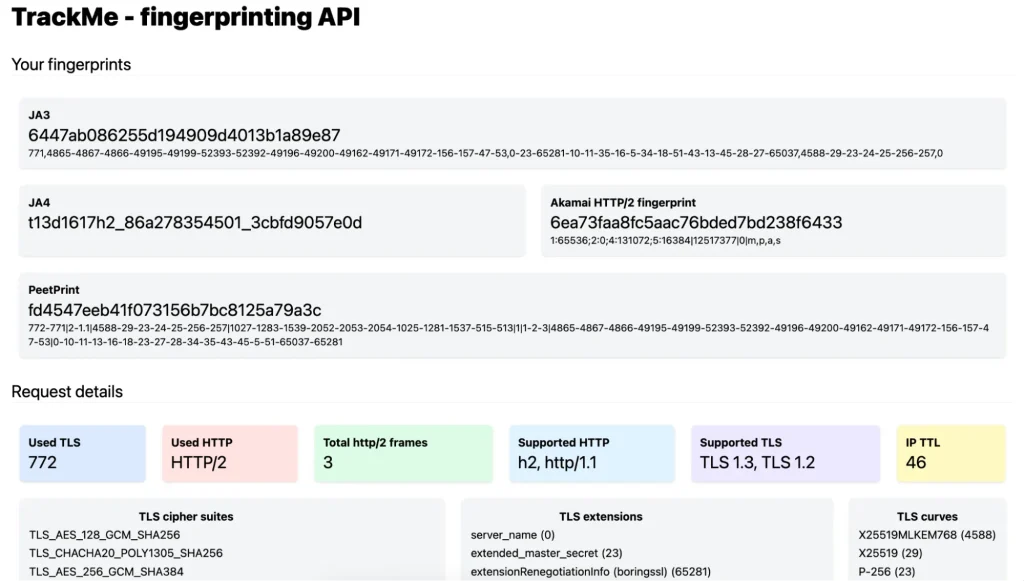
Critical for both types. Cloudflare, Akamai, and DataDome fingerprint the TLS handshake (JA3, JA4 methods) and HTTP/2 SETTINGS frame before they check the IP. A clean mobile IP paired with Python’s urllib3 TLS stack gets challenged by Cloudflare faster than a datacenter IP with a Chrome-like handshake. Ask how the provider keeps exit-node TLS fingerprints realistic. If they can’t answer, it means the provider does nothing about it.
Verify how precise the geo-targeting really is
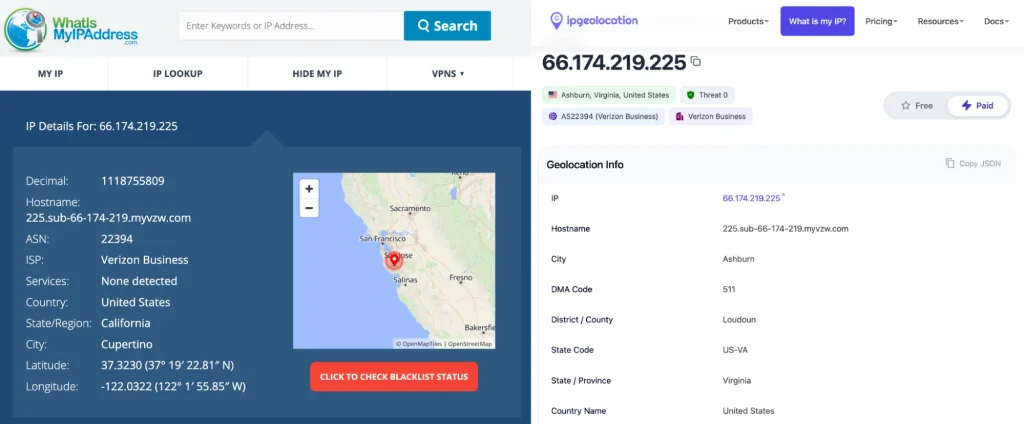
Critical for residential geo tasks. A weak spot of mobile. The carrier’s gateway determines each mobile IP’s geolocation. It often comes down to the state or province level, sometimes only the country level. Documented deviations of 1,000+ km between the user and the geolocated city are common. Residential goes to the city or ZIP. Ask the provider what geo precision they can provide and how that gets verified. If the answer is “city” without a verification method, treat it as marketing.
Ask where the provider’s IP pool comes from
Specifically matters for residential. Residential pools come from SDK affiliate networks: apps and browser extensions embed a proxy SDK on a user’s device in exchange for revenue, and end-user devices become exit nodes. Ethical sourcing means explicit opt-in, revocable consent, and named partner apps (Honeygain or Pawns.app). Non-ethical sourcing hides the SDK in utility apps without user knowledge. In January 2026, Google Cloud publicly disrupted IPIDEA, one of the largest unethical residential proxy networks. Providers like Private Proxy transparently share their pool sourcing methods. If a provider cannot answer this question, the pool is probably one you shouldn’t use.
Estimate the real cost (not the sticker price)
Applies to both; the calculations differ. Per-GB pricing (typical for residential) needs to be multiplied by realistic page weight and retry rate. On average, a web page weighs 2 to 3 MB. JS-heavy targets like Amazon, Instagram, and LinkedIn weigh 5 to 10 MB per request, and can exceed 15 MB with ads. Add 15 to 30% failed requests on protected targets, plus captcha solving overhead. This will give you the real cost, which is typically 2 to 3 times higher than provider estimates. Mobile per-port flat pricing works differently: the constraint is concurrent ports per IP, not raw bandwidth.
Test before you trust
Applies to both. Run six checks on any IP before you commit:
1. ASN check. Use whois or bgp.he.net. The IP should resolve to a mobile carrier or consumer ISP. If the results show hosting ASNs (AWS, DigitalOcean, OVH), it’s a red flag.
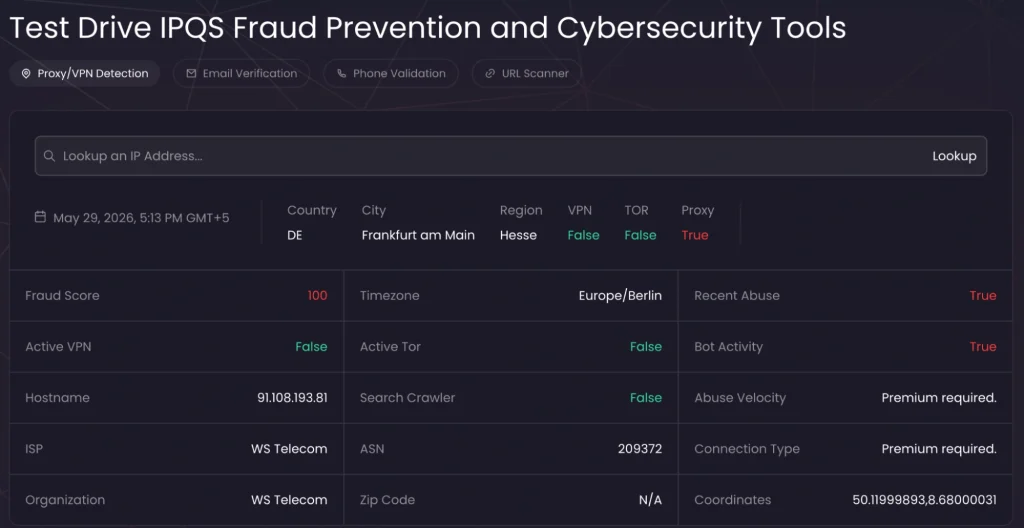
2. Fraud-score databases. Run the IP through IPQualityScore.com, Scamalytics, and Spur.us. A fraud score below 30 is clean. Above 75 means the pool is burnt.
3. WebRTC leak test. Use browserleaks.com. The reported public IP must match the proxy exit and not your real connection.
4. DNS leak test. Use dnsleaktest.com or run dig through the proxy. DNS should resolve through the proxy and not your local resolver.
5. TLS fingerprint check. Visit tls.peet.ws to see your client’s JA4. Default Python urllib3 JA4 is instant detection.
6. Geolocation cross-check. Query several GeoIP services. If they don’t show the same city, the provider’s geo claim is unreliable. (Example included above in “Verify how precise the geo-targeting really is.”)
Conclusion
When you choose between mobile and residential, what matters isn’t the proxy type, but the request your workflow makes. Use mobile for app-tier platforms where carrier ASN is your trust indicator: Meta, TikTok, mobile ad verification, mobile-only APIs. Use residential for everything where session length, geo precision, or throughput matter more than ASN class: scraping at scale, B2B SaaS account management, sneaker drops, price monitoring, AI agent browsing. When your workflow fits both, pick a provider that offers both proxy types under one plan to avoid maintaining two contracts and two integration paths.
Frequently Asked Questions
Please read our Documentation if you have questions that are not listed below.
-
Can residential proxy usage be detected?
Yes, though it’s harder than detecting datacenter IPs. Modern anti-bot systems use behavioral signals to detect residential proxies, for example, rapid rotation across unrelated ISPs, request velocity above human patterns, impossible geographic travel between requests, and browser fingerprint inconsistencies. Cloudflare publishes machine-learning models specifically trained to identify residential proxy abuse without blocking the IP itself.
-
Do I need a paid tool or can I check this manually?
The manual approach proves its worth under three conditions: not more than 10-15 priority keywords without multi-country tracking, and client reporting requirements. If the situation changes, manuals stop scaling. Run a manual mode for a month before paying for anything. You'll know if the workload justifies a tool.
-
What's the difference between residential and private proxy?
"Private proxy" usually means a dedicated IP assigned to one user. The type can be anything — datacenter, residential, or ISP. "Residential proxy" describes the IP source (real household ISP). These two labels aren’t opposite categories: a private proxy can be residential. Check the IP class —it can differ from the marketing term.
-
How long does a sticky mobile session actually last?
Realistically, 10 to 30 minutes, bounded by the carrier's session lifetime. Providers advertising "24-hour sticky" on mobile usually remap private IP to public IP at their gateway, which still changes the IP from the target's perspective. Ask the provider for the realistic minute count before signing up.
-
How much bandwidth do I really need per task?
A modern JS-heavy page weighs 5 to 15 MB per request. So 1 GB equals roughly 70 to 200 page loads, not "thousands." Plan for 50 to 100 GB per 10,000 pages on Amazon, Instagram, or LinkedIn. Lighter targets like Google SERP or simple APIs use 10 to 30 GB per 10,000 requests.
-
Are residential proxies better than datacenter proxies?
This depends on the target. Residential IPs are better if you’re working with protected sites (Cloudflare, Akamai, anti-bot-heavy targets), because residential ASNs occupy higher trust tiers than hosting ASNs. However, for permissive targets (basic scraping, RAG retrieval, low-restriction sites), datacenter proxies are faster and cheaper.
Top 5 posts





![7 Best Residential Proxy Providers [2025]](https://privateproxy.me/wp-content/uploads/2024/04/580x348-8-Best-Cheapest-Residential-Proxies.png)
Perplexity rank tracking measures whether your URLs appear as cited sources in Perplexity's AI-generated answers. It looks like Google rank tracking, but the mechanics are different: live retrieval per query, geo-localized results, and non-deterministic outputs. The tool you pick decides how much of that reality you actually see.